Monday, November 23, 2015

Flipped Parent-Teacher Conferences

Flipped Parent-Teacher Conferences

Parent-teacher conferences are an exciting time to build relationships with parents, learn more about their child from their perspective, and communicate what I have seen in their child up to that point. One of the drawbacks to conferences is the lack of time to have these conversations. Many teachers are limited to conferences lasting for about five minutes. In five minutes I could not describe my class and the expectations while still being able to listen to parental concerns and advice about how to best meet the needs of their child and that is why a few years ago I began to flip my parent-teacher conferences.

Click here to watch the full video.


I decided to flip parent-teacher conferences so that I could (hopefully) eliminate the classroom procedural portion of the conversation and focus on the discussion of the student. I used Doceri on my iPad and took screenshots of the various content I wanted parents to know about prior to our meeting: our weekly assignment board, Edmodo page, grading categories and scale, and how they would view those two in our grading system, Infinite Campus.
*Using my iPad and green screen in my classroom to make a flipped parent-teacher conference video. Video is finalized using TouchCast.
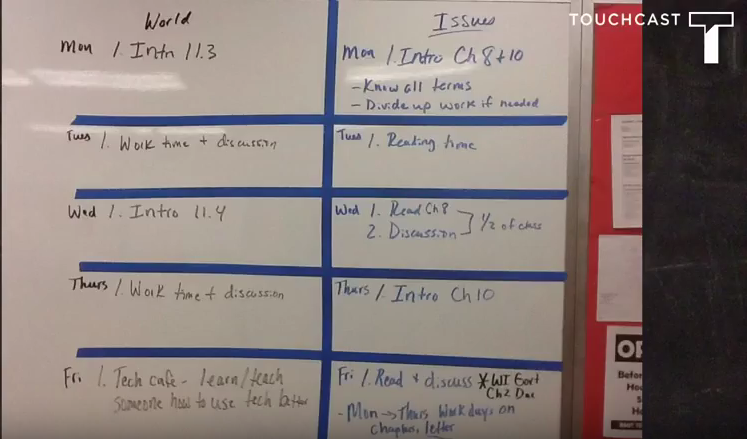


*I used the camera on my iPad to take a photo of my classroom whiteboard to add to my video.


*Using Doceri on iPad, Doceri is in capture mode. I used the pen feature to black out students names and then took a screenshot to use in the final production of my video.


*I brought up Infinite Campus on my computer, which was mirrored on my iPad. Doceri is in capture mode and then I used the pen to black out student names and the class section.

What I love about Doceri is how easily I am able to make screencasts. I search the web for photos to add into the background and import them into my projects, or I bring up the screenshot I want on my computer and it is mirrored on my iPad. Then, using Doceri’s capture feature, I make notes on the image and take a screenshot of what is on my iPad at that moment to become the custom picture I want to display. When I had all of my screenshots ready I loaded them into another program, TouchCast so that I could make a video using my green screen and school photo as a background. I posted the video to my YouTube channel and sent the link to parents through Infinite Campus messenger.

At conferences, parents told me they enjoyed being able to get a student-view of what was taking place in our classroom. Instead of me telling them in person that it was important for students to post course work and comments on Edmodo, they could see an actual Edmodo page. As I was explaining in the video how grades were calculated and entered, they could see an actual example from Infinite Campus and these examples helped free up our conference for what really mattered-the progress and development of their child.


With the amount of parents that attend conferences, I knew that there would most likely be a line of people waiting to have our conference. I wanted to give parents the opportunity to watch the flipped parent-conference video if they had not already done so. I posted a sign instructing parents to watch the video that I had cued on my iPad and encouraged them to pass it on to the next group as they waited. Using Doceri, my iPad and TouchCast gave me more time in each conference to focus on the student and not the procedural workings of my classroom.

Click here to read my "Teacher Feature" on the Doceri blog. 

Sunday, September 20, 2015

Hello Speed Dating- A Flipclass Version of a Get-to-Know-You Activity Using Doceri

The beginning of every school year presents unique challenges and this year was no different. Each year I try to think of creative ways to have my students get to know each other. For the first time in my career I found myself teaching a semester course called American Issues. Due to the fact that I was teaching these students for only a semester, I wanted to expedite this process and help me and my students get to know each other faster. Inspiration came from a pirate, a colleague and Doceri.

To start off the school year our district brought in the author, the Pirate himself, Dave Burgess. Dave started off his presentation with a "taboo" topic pictured on the screen to get the audience interested in what might be discussed during the presentation and create some excitement and nervous tension in the room. I decided to use a similar idea for my students. I have been lucky to work with a dedicated, creative and collaborative colleague, Jason Bretzmann, for the past 13 years. Jason shared an idea with me about how he was going to have his class participate in a quick get-to-know-you activity. As I listened to Jason's idea, it helped me to create my own activity by combining the "taboo topic" idea from Dave and the idea of a speedy introduction from Jason.

Doceri is my all-time favorite tech tool and it is the one I cannot teach without. I decided to start off each class period with this on the SMART Board:

I created a brief Doceri recording of instructions for my students to listen to at the start of class on day two. As students walked into the classroom and saw the screen, they were unsure what was going to take place in class that day. That was exactly what I wanted. I love how easily Doceri allows me to create custom presentations. I quickly and easily found the pictures I wanted from the Internet and added a picture of my classroom that I took directly from my iPad. Using my iPad, I can easily record what I want to say over the slides. I am also able use Doceri to control my laptop and access all of my files, including a Google document that I created specifically for this introduction activity, and have it all work together seamlessly.  

Doceri makes it easy to replay your recording throughout the day as well as upload your recording to, for example, your own YouTube channel or Edmodo account for future use. With Doceri, your presentations are limited only by your creativity.

To watch the full version, click here. Hello Speed Dating
Speed Dating------Speed Getting to Know You 


Saturday, August 29, 2015

Personalized PD: Flipping Your Professional Development

Over a year ago, I began another journey as a Project Coordinator and co-author for my most recent book, "Personalized PD: Flipping Your Professional Development." I am very excited to share all of the great ideas by our authors: Jason Bretzmann, myself, Dr. Brad Gustafson, Brad Currie, Kristin Daniels, Laura Conley and Ben Wilkoff. Personalized PD describes the changing landscape of education and professional development and how to best meet the needs of professional educators.

My chapter, Personalized PD: A Teacher's Perspective, focuses on the ABCCs: A- Attendance, B-Balance, C-Choice, and C-Communication to guide administrators' decisions for professional development.

Please read below to learn more about Personalized PD.


What should professional development look like? Can all teachers get exactly what they need? How do we energize every individual to realize their full potential?

Personalized PD: Flipping Your Professional Development helps answer these questions and more. Seven authors from throughout the United States start from the accurate premise that teachers are learners. Like all learners, teachers learn at different paces and start in different places. Personalized PD meets all educators where they are and seeks to help each individual move forward at their own pace and toward self-determined goals. It’s how teachers can get what they individually need so they can be even better for their students.

The authors take you through their experiences while giving you their best “pro tips” and most useful technology tools. They’ll save you time and research by pointing you in the right direction right now. Each chapter gives you a window into how these practicing educators execute their plan to get every teacher what they need and move each individual toward their own plan of learning. Plus, short vignettes expand on and go deeper into the most useful tools and techniques.

Come join the conversation, and be part of the fundamental change in professional development we call CHOICE (Constant progress, Honoring professionals, Ongoing learning, Individualized focus, Collaborative learning, Energizing experiences).

Personalized PD: Flipping Your Professional Development will help you get there!
Order NOW using PayPal:


Book Options

Or

Order from Amazon.com by clicking the link below:
Personalized PD

*PLEASE NOTE: 
-Orders placed to Canada have a $6 shipping fee.
-Orders placed outside of the main U.S. and Canada  have a $14 shipping fee.
We will ship your book as soon as soon as the order is processed. Contact me directly at kennybosch@hotmail.com with questions.

Follow me on Twitter: @kennybosch

Friday, November 15, 2013

Flipping 2.0 Book Order

Thank you for your interest in my book!

"Flipping 2.0 --Practical Applications for Flipping Your Class"


If you've decided to flip your class, you probably have new questions: How do I do this? What will it look like? What will students do in class? How will I create learning experiences for students outside of class? What have other teachers done? Flipping 2.0:Practical Strategies for Flipping Your Class seeks to answer your questions. And it opens the dialogue for us to continue to learn together. In this book, you will follow practicing classroom teachers as they walk you through their flipped classroom journey; why and how they made the change, what obstacles they overcame, the technology they used, and where they are heading next. As a flipped learning teacher, you need time to check out workable solutions that other teachers have created. Look inside their classrooms and learn from their experiences. Watch flipped teachers at work. Pick the brains of those who ve been there, and join the conversation. You ll find something useful in every chapter. And there is a chapter just for you in this book. With a chapter on mastery learning by Brian Bennett, two chapters on English by Cheryl Morris/Andrew Thomasson and Kate Baker, two chapters on social studies by Jason Bretzmann and Karl Lindgren-Streicher, two chapters on math by Audrey McLarenand John Stevens, two chapters on science by Marc Seigel and David Prindle, Google tools for flipping by Troy Cockrum, two chapters on technology by Cory Peppler and Tom Driscoll/Brian Germain, part-time flipping by Kenny Bosch, elementary school flipping by Todd Nesloney, middle school flipping by Nichole Carter, world languages flipping by Heather Witten, tech ed flipping by James Michlig, co-flipping by Cheryl Morris/Andrew Thomasson and even flipping your professional development by Kristin Daniels. Read Flipping 2.0 today and make your decision to flip a reality.
 
The cost of this amazing book is $24.95 plus $3.00 shipping. 
*Please use the PayPal link above to order. 


I am excited to share my thoughts on flipping the traditional classroom in this great book along with so many other great contributors that includes authors from around the country and Canada.

*PLEASE NOTE: 

-Orders placed to Canada have a $6 shipping fee.
-Orders placed outside of the main U.S. and Canada  have a $14 shipping fee.
We will ship your book as soon as soon as the order is processed. Contact me directly at kennybosch@hotmail.com with questions.


Tuesday, October 29, 2013

Not a Broadcast but a TouchCast

One of areas I felt I could grow the most as a professional was my ability and effort in communicating with parents. In the past, looking up phone numbers and contacting home was usually more work than it was worth. I say this because all too often, I would call and get an answering machine never knowing if the message was received or deleted. Over time, Infinite Campus (IC) was introduced in my school district and this tool greatly increased my communication with parents. I found IC to be a useful tool, but again, it limited what I was actually able to communicate to parents to nothing more than a basic group email and maybe an attachment.

Last school year I was given an iPad and I began to explore and find useful apps in my professional life. What I found and began to implement was an app called TouchCast. TouchCast is an iPad app full of functional, useful tools to help broadcast information, ideas, surveys, documents and much more. As a presenter, you are able to add sound effects, incorporate live news and sports feeds, change the lighting, use a whiteboard and my favorite, type out your ideas into the teleprompter to use during your TouchCast, just like the pros.

Some of the ways I have used TouchCast so far include:

1. An introduction to TouchCast and ways that teachers could leverage this tool:
http://www.touchcast.com/bosch/Heres-How-to-Use-TouchCast-as-a-Teacher

2. I flipped parent/teacher conferences by sending out this TouchCast a few days before conferences covering the basic parts of my classroom leaving more time to discuss each student and their performance in class.
Regular U.S. History http://www.touchcast.com/bosch/The-Latest-on-US-History/
A.P. U.S. History  http://www.touchcast.com/bosch/The-Latest-on-AP-US/

3. I participate in a Twitter book discussion on the third Tuesday of each month related to the book Flipping 2.0 Practical Strategies for Flipping your Class, of which I wrote a chapter. I was asked to make a brief video of some sort introducing my chapter. I used TouchCast to make this brief video.
http://www.touchcast.com/bosch/The-Latest-on--Flipping-20

In my classes, I encourage students to use technology to share with the other classes and the world what they have learned (See three part blog below). I will introduce them to TouchCast this year and show them a few projects as exemplars. In my A.P. class I am thinking of a new project where students will use TouchCast to present a news story from any time period they choose. One example could be: students dress in Colonial Era clothes and present a news broadcast of the Boston Massacre or Boston Tea Party.

If you have an iPad, look into TouchCast and experiment with ways in which you and your students could incorporate this great technology into your course.


Thursday, September 26, 2013

20% Time, Genius Hour or Student Choice. I call it "My Interests." Part III of III

Part III of III

Any instructional strategy or method can lose its charm or effectiveness over the course of a year-long course and having alternative options for students helps to keep the course exciting and new for everyone involved. Below are a few options I have experimented with and enjoyed implementing last school year.

Option 1:
Part of Friday "My Interest" became a show and tell or how-to time where I would call up students to explain exemplary work and how they made their project using tech. The students were honored to be the ones leading discussion, they competed to be the next ones to get to be the example and they taught me new technology along the way.
*Note: In the beginning of the year I would model some technology for them and give them some ideas on how to use the technology.

Options 2:
Other ways I utilized "My Interest" days was to have students "huddle up" with similar projects. So, if three students worked on organized crime they huddled up to discuss what they learned, used their devices to look at each others work on Edmodo and discuss and comment. Then, as a class we could have each group report back on what the learned as the "experts" on their topics.

Option 3:
To change it up, on Fridays of my choosing I would have a representative from each topic get with other topics so that there were people in your group that had not studied the same topic and they could ask you questions. Meaning that each a group had someone that studied organized crime, flappers, prohibition, ect. Each student in the group became the expert on their topic. We would almost always come back as a large group and have a class discussion of the chapter.

The fun, exciting part as a teacher was that every hour and group was unique. I enjoyed being able to walk around the room and participate in group discussions with each one presenting me with new challenges!


If you enjoyed what you read here, please follow me on Twitter- @kennybosch. If you would like to order a copy of the book I was a  co-author of for more examples of the flipped classroom from a great group of authors, please see my "Flipping 2.0"  blog below.

Thanks for reading!